


AI Car Designer Modify & Tune
4.4288.00 Reviews
App Specs
- Version
- 1.0.19
- Updated On
- License
- Free
- Downloads
- 100,000+
- Developer
- MOBIVERSITE YAZILIM BILISIM REKLAM VE DANISMANLIK
- Categories
- Auto & Vehicles
- Platform
- Android
Screenshots


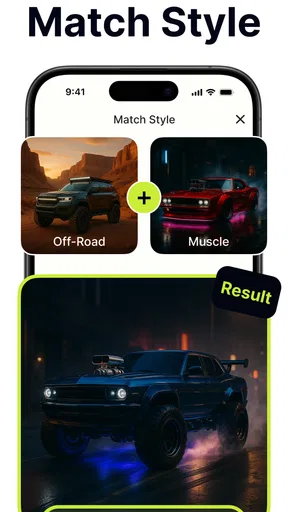
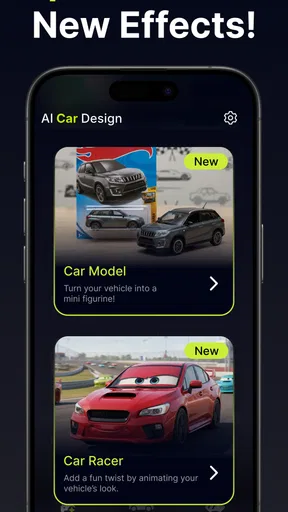
 Analysis by AppCompare
I like car-design apps most when they make it easy to explore an idea without requiring a workshop, specialist software, or a detailed plan. AI Car Designer Modify & Tune is aimed at that kind of experimentation: it gives car fans a place to imagine changes, compare looks, and play with a vehicle concept on a phone. I’d treat it as a creative design tool rather than a substitute for professional automotive software or advice.
A good fit for visual experiments
The appeal is clearest if you already have a car in mind, whether it is your daily driver or simply a style you like. You can start with a visual direction—subtle, sporty, or deliberately bold—and use the app to explore what that idea might look like. That makes it useful for inspiration before a real-world project, but the result should be treated as a concept, not a parts list or a guarantee that a modification will fit.
It also suits people who enjoy trying combinations just to see where they lead. A new paint direction, a different wheel look, or a more dramatic overall style can be satisfying even when there is no intention to modify a real car. If you want precise compatibility information, technical specifications, or a shopping guide, a dedicated vehicle reference or a professional’s advice is a better choice.
Build a baseline before chasing details
I get more value from this kind of tool when I make one clear change at a time. I would first settle on the general look I want, then adjust a small number of details and compare the result with the starting point. Changing everything at once can make it hard to tell which choice improved the design and which one simply added noise.
A practical habit is to decide on a visual priority before opening the editor: perhaps the wheels should define the look, or the body color should remain understated while other details carry the personality. That simple constraint makes experimentation more focused. It also helps when sharing a design, because a coherent idea is easier for other people to respond to than a collection of unrelated tweaks.
What to check before spending time or money
The app is free to install, though it offers in-app purchases ranging from a few dollars to higher-priced items. I’d explore the basic workflow first and only consider paying if a specific paid option clearly matters to the way I want to use it. That is a better approach than assuming every customization tool is included at no cost.
It is an Auto & Vehicles app from MOBIVERSITE YAZILIM BILISIM REKLAM VE DANISMANLIK, with an Everyone content rating. Its average rating is 4.4 from around 8,300 ratings, and it has been installed over 100,000 times. The current version is 1.0.17, and it runs on Android 8.0 or later. Those details make it easy to judge whether it is a plausible fit for your device and comfort level, but they do not replace trying the actual editing flow for yourself.
Worth Reading Before You Choose

Flipboard Shows What News Apps Must Do Beyond the Feed

Switching to Android Auto Means Rethinking Your Driving Routine

Google Calendar Makes a Crowded Week Easier to Manage

Ludo King Makes the Most of the Minutes Between Plans

Baby Panda World Brings Quick Play to Modern Phones, but Its Game Library Feels Busy

ESPN’s Live Game View Makes Following Close Games Easier
Getting Started with Your Dream Garage
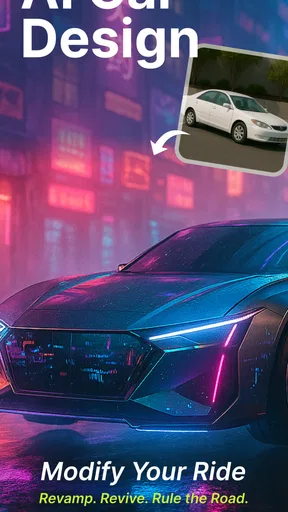
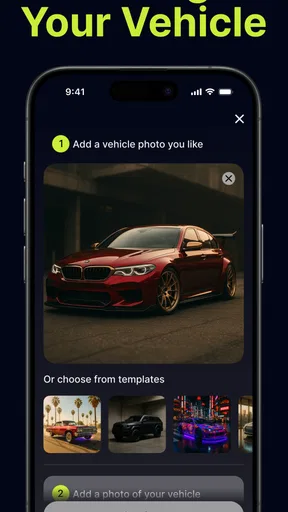
First things first, downloading the app was a breeze. A quick visit to the App Store and I was ready to roll. Once installed, the interface welcomes you with sleek graphics and a user-friendly layout. Even if you're not super tech-savvy, navigating through the options is pretty straightforward. AI Car Designer Modify & Tune is all about customizing to your heart's content, and it makes sure you feel right at home from the get-go.
Customization Like Never Before
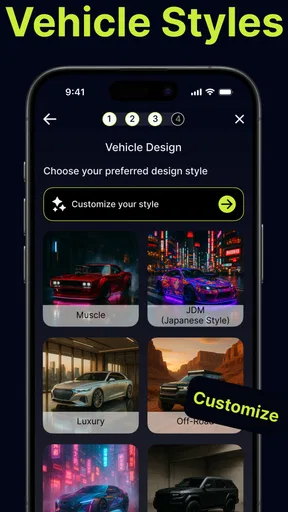
Now, let’s dive into the meat of the app: the customization features. Honestly, I was blown away by the sheer number of options. From changing the color of the paint to tweaking the smallest details like the rims and spoilers, it felt like I was living inside a Fast & Furious movie. The app uses AI to suggest modifications based on your previous choices, which is pretty neat. It's almost like having a personal car designer whispering in your ear.
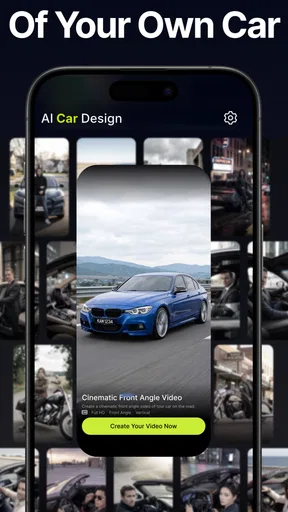
One of the coolest features is the ability to test drive your creation. Yes, you heard it right! You can virtually take your modified car for a spin, which adds a whole new level of excitement. The controls are intuitive, and the graphics make it feel surprisingly realistic.
Performance Tuning for the Gearheads
If you’re more into what’s under the hood, the app has you covered there too. You can tweak the engine, suspension, and even the aerodynamics of your car. The app provides detailed feedback on how each change affects performance, which is great if you’re aiming for that perfect balance between speed and handling. I spent hours just fiddling with the settings to see how different components affect the drive.
Community and Sharing
Another standout aspect is the community feature. You can share your designs with other users and even get feedback. It’s like being part of a virtual car club where everyone’s just as passionate about cars as you are. I uploaded one of my designs and got some awesome suggestions on how to make it even better. Plus, browsing through other people's creations is a fantastic way to get inspiration for your next project.
The Verdict
So, is AI Car Designer Modify & Tune worth your time? If you’re a car enthusiast or just someone who loves to tinker with designs, this app is definitely a must-have. It’s not just about making cars look cool; it’s about understanding the intricacies of car design and performance. Whether you’re waiting for the bus or chilling on your couch, you can dive into a world of creativity and speed.
To wrap it up, this app is a fantastic tool for anyone looking to unleash their inner car designer. It’s fun, educational, and incredibly engaging. So go ahead, give it a spin, and see where your imagination takes you!
Make each session easier to compare
Once you have a direction, a repeatable routine can save time: begin with the same vehicle and view, make one visual adjustment, and pause to assess the whole design before moving to another part. The point is not to turn casual play into a strict project. It is simply a way to avoid losing track of what changed when several styling choices are made in quick succession.
I’d also use the AI suggestions as prompts rather than instructions. If a recommendation feels close to your idea, try it and judge the result; if it pulls the design away from your goal, ignore it. This keeps the creative process yours and makes the app’s assisted approach useful without letting it dictate the final look.
Useful habits for sharing a design
Before posting a design for feedback, I’d make sure the main idea is easy to read. A focused build gives other users something concrete to comment on, such as whether a restrained color works with a more assertive wheel choice. If you are still exploring, sharing an early version can be worthwhile too, but it helps to say what kind of feedback you want rather than asking people to judge every detail at once.
Browsing other users’ work can be more than a source of ideas. It can help you notice combinations you would not have tried on your own, then test those ideas against your own taste. I would avoid copying a complete design as a shortcut; borrowing one element and adapting it is a better way to develop a style that feels personal.
Where the simulation has limits
The app’s visual and tuning language can make experimentation feel convincing, but I would not use an in-app result to decide whether a real modification is safe, legal, compatible, or worth buying. A virtual change is useful for imagining a direction; real parts and vehicle behavior involve details that a creative phone app cannot settle for you. For an actual build, confirm fitment and safety with reliable vehicle-specific sources or a qualified professional.
That distinction matters especially for performance-minded users. Trying engine, suspension, or aerodynamic adjustments can be entertaining and may help you think about trade-offs, but it is not the same as learning how a particular car will behave on the road. If your main goal is engineering-level accuracy, a specialized simulator or technical reference will serve you better than a design-first mobile experience.
Who will enjoy it, and who may not
I’d recommend it to casual car fans, visual thinkers, and anyone who likes sketching out a modification idea before discussing it with friends. It can also be a relaxed way to spend a short break: settle on a theme, try a few changes, and leave with a clearer concept than you started with. Its creative focus is the draw, not a promise of professional-grade planning.
On the other hand, someone who wants exact parts compatibility, workshop instructions, or dependable real-world performance predictions should look elsewhere for those answers. People who dislike trial and error may also find AI-assisted design less satisfying than a conventional editor with precise, manual control. The best fit is someone comfortable treating suggestions and simulated outcomes as inspiration.
My final take on the workflow
Released on May 15, 2025, this free app gives car enthusiasts a low-commitment way to try styling and tuning ideas, with optional purchases if they want to explore paid items. I would start with a clear visual goal, make changes in small steps, and use sharing to invite focused feedback. That routine makes the experience more rewarding than making random edits and hoping the pieces come together.
For me, the strongest reason to keep it around is the quick bridge between an idea and a car concept I can actually look at. Its limits are worth keeping in mind, but they do not erase that simple creative value. If you want a playful place to experiment with a vehicle’s appearance and explore tuning concepts, it is worth trying; if you need hard technical answers, choose a tool built for that job instead.
Pros
- Highly intuitive user interface.
- Wide variety of car models available.
- Realistic 3D rendering effects.
- Extensive modification options.
- Regular updates with new features.
Cons
- Occasional lag on older devices.
- In-app purchases can be pricey.
- Requires constant internet connection.
- Limited free customization options.
- Large app size impacts storage.
FAQs for AI Car Designer Modify & Tune
What features does AI Car Designer Modify & Tune offer?
AI Car Designer Modify & Tune provides a comprehensive suite of tools for customizing and tuning virtual car models. Users can modify car aesthetics, adjust performance settings, and explore an array of visual enhancements. The app includes a user-friendly interface with intuitive controls and offers real-time previews to see changes instantly.
Is AI Car Designer Modify & Tune suitable for beginners?
Yes, AI Car Designer Modify & Tune is designed to be accessible for both beginners and experienced users. It includes tutorials and guides to help new users understand the features and functionalities. The interface is straightforward, allowing users to easily navigate the app and start designing their ideal car without prior experience.
Does the app require an internet connection to function?
AI Car Designer Modify & Tune primarily operates offline, allowing you to design and modify cars anytime without needing an internet connection. However, certain features, such as downloading additional car models or accessing cloud storage for saving designs, may require internet connectivity.
Are there in-app purchases in AI Car Designer Modify & Tune?
Yes, while the app offers a range of free features, it also includes in-app purchases. These may include premium design templates, exclusive car models, and advanced tuning options. Users can choose to enhance their experience by purchasing these additional features, but it is not necessary for basic functionality.
How can I share my designs from AI Car Designer Modify & Tune?
The app provides several options for sharing your creations. You can export designs as high-quality images or 3D models and share them on social media platforms directly from the app. It also supports sharing via email or messaging apps, making it easy to showcase your designs to friends or communities.


